***

| Url | https://www.durafence.eu/configurator/ |
| --- | --- |
| MetaTitle | Plan your fencing online - DURAfence Planner |
| MetaDescription | Wooden fence planner. Design your own horse fencing with our online tool. DURA Fence System by Peter Müller |

# Configurator

- [Introduction](#tab1)
- [Design](#tab2)
- [Gates](#tab3)
- [Terrain](#tab4)
- [Contact](#tab5)


This configurator allows to to describe your fence in a few simple steps. After collecting all technical apsects of your fence, you may send us a quote request without any obligation. If the configurator does not allow for all options, or if your prefer more personal advice, do not hesitate to contact us directly.

[Configure your **fence online** now]()

## Step 1 : Design

Define here the general appeareance of your DURAfence fencing

***

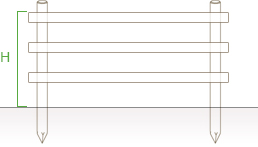
### 1. Heigth of the fence

1. <label for="rblHeight_0">130 cm</label>
2. <label for="rblHeight_1">155 cm</label>
3. <label for="rblHeight_2">185 cm</label>

  
![](/custom/images/configurator/piquets-hauteur.jpg)

***

### 2. Number of rails

1. <label for="rblNumberSmooth_0">2 - Double</label>
2. <label for="rblNumberSmooth_1">3 - Triple</label>
3. <label for="rblNumberSmooth_2">4 - Quattro</label>

***

### 3. Post type

1. <label for="rbPiquet_0"><img src="https://www.durafence.eu/custom/images/configurator/piquets-ecorces.png" class="img-responsive" style="margin: 0 auto 15px auto;">Cundy peeled posts</label>
2. <label for="rbPiquet_1"><img src="https://www.durafence.eu/custom/images/configurator/piquets-fraises.png" class="img-responsive" style="margin: 0 auto 15px auto;">Machine rounded posts</label>
3. <label for="rbPiquet_2"><img src="https://www.durafence.eu/custom/images/configurator/piquets-fraises-forage-luna.png" class="img-responsive" style="margin: 0 auto 15px auto;">Machine rounded <strong>with semicircular drilling</strong></label>
4. <label for="rbPiquet_3"><img src="https://www.durafence.eu/custom/images/configurator/piquets-fraises-forage-radia.png" class="img-responsive" style="margin: 0 auto 15px auto;">Machine rounded <strong>with round drilling</strong></label>
5. <label for="rbPiquet_4"><img src="https://www.durafence.eu/custom/images/configurator/piquets-fraises-forage-longa.png" class="img-responsive" style="margin: 0 auto 15px auto;">Machine rounded <strong>with elongated drilling</strong></label>
6. <label for="rbPiquet_5"><img src="https://www.durafence.eu/custom/images/configurator/piquets-carres.png" class="img-responsive" style="margin: 0 auto 15px auto;">Square posts</label>

***

### 4. Rail type

![](/custom/images/configurator/type_lisse.png)

1. <label for="rblSmooth_0">half-round timber</label>
2. <label for="rblSmooth_1">round timber</label>
3. <label for="rblSmooth_2">poling board</label>

***

### 5. Post impregnation

#### Eco-friendly salt impregnation treatment in 3 colours\*

As well as the classic olive green look of the salt impregnation treatment, the DURAfence range also offers a more aesthetically pleasing version with brown or black salt colouring:

<label for="rbImpregniationCat4Field1"><img src="https://www.durafence.eu/custom/images/configurator/imp-sel-olive.jpg" style="float:left;"> <div><strong>Olive</strong> </div> </label> <label for="rbImpregniationCat4Field2"><img src="https://www.durafence.eu/custom/images/configurator/imp-sel-brown.jpg" style="float:left;"> <div><strong>Brown</strong> </div> </label> <label for="rbImpregniationCat4Field3"><img src="https://www.durafence.eu/custom/images/configurator/imp-sel-dark.jpg" style="float:left;"> <div><strong>Dark</strong> </div> </label>

\*Please note that the colors shown are not necessarily representative of our color range. It is better to rely on reliable wooden samples, as the colors can vary depending on the type of wood and the impregnation product. Please also be aware that the color may change slightly over time and depending on weather conditions.

## Step 2 : Gates

Choose one or more wooden gates :

***

### Choose a gate

1. <label for="C_T_DefaultRegion_M7476_Form_cblPortal_0"><img src="https://www.durafence.eu/custom/images/configurator/modell_panda.jpg" alt="" class="img-responsive fence-mg-top"> Panda</label>
2. <label for="C_T_DefaultRegion_M7476_Form_cblPortal_1"><img src="https://www.durafence.eu/custom/images/configurator/modell_buffalo.jpg" alt="" class="img-responsive fence-mg-top"> Buffalo</label>
3. <label for="C_T_DefaultRegion_M7476_Form_cblPortal_2"><img src="https://www.durafence.eu/custom/images/configurator/modell_cheval.jpg" alt="" class="img-responsive"> Cheval</label>

***

<label for="C_T_DefaultRegion_M7476_Form_txtPortal" id="C_T_DefaultRegion_M7476_Form_lblStep2NumberPortal">Numbre of gates :</label>

## Step 3 : Terrain

Use the interactive map to define the exact location and course of your fence. You can use the zoom functions (+ and -) to adjust the map and precisely mark the perimeter of your desired fence by clicking on the map and setting markers.  
  
Optionally, you can enter the required fence length **in metres** in the following field.

***

<label for="manualLength"><span id="C_T_DefaultRegion_M7476_Form_lblManualLength">Total length of the fence (in metres)</span></label>

***


0 m²

0 km²

0 acres

0 hectares

0 feet²

0 square miles

0 square nautical miles

## Output : Total Area(s)

0 m²

0 km²

0 acres

0 hectares

0 feet²

0 square miles

0 square nautical miles

## Step 4 : Contact

Thank you. The configuration of your fence finished. You may send us your personal data to request a detailed quote for delivery and the installation of your DURAfence fencing system.

<label for="C_T_DefaultRegion_M7476_Form_txtLastName" id="C_T_DefaultRegion_M7476_Form_lblLastName" title="Last Name" class="control-label bold">Last Name</label>

This is a required field.

<label for="C_T_DefaultRegion_M7476_Form_txtFirstName" id="C_T_DefaultRegion_M7476_Form_lblFirstName" title="First Name" class=" control-label bold">First Name</label>

This is a required field.

<label for="C_T_DefaultRegion_M7476_Form_txtCompany" id="C_T_DefaultRegion_M7476_Form_lblCompany" title="Company" class=" control-label">Company</label>

<label for="C_T_DefaultRegion_M7476_Form_txtAddress" id="C_T_DefaultRegion_M7476_Form_lblAddress" title="Address" class=" control-label">Address</label>

<label for="C_T_DefaultRegion_M7476_Form_txtZip" id="C_T_DefaultRegion_M7476_Form_lblZip" title="Zip code" class=" control-label">Zip code</label>

<label for="C_T_DefaultRegion_M7476_Form_txtCity" id="C_T_DefaultRegion_M7476_Form_lblCity" title="City" class=" control-label">City</label>

<label for="C_T_DefaultRegion_M7476_Form_txtCountry" id="C_T_DefaultRegion_M7476_Form_lblCountry" title="Country" class=" control-label">Country</label>

<label for="C_T_DefaultRegion_M7476_Form_txtEmail" id="C_T_DefaultRegion_M7476_Form_lblEmail" title="Email" class=" control-label bold">Email</label>

This is a required field. This e-mail address is not valid.

<label for="C_T_DefaultRegion_M7476_Form_txtPhone" id="C_T_DefaultRegion_M7476_Form_lblPhone" title="Phone" class=" control-label bold">Phone</label>

This is a required field.

<label for="C_T_DefaultRegion_M7476_Form_txtTva" id="C_T_DefaultRegion_M7476_Form_lblTva" title="VAT number" class="control-label">VAT number</label>

<label for="C_T_DefaultRegion_M7476_Form_txtMessage" id="C_T_DefaultRegion_M7476_Form_lblMessage" title="Message" class="control-label bold">Message</label>

<textarea name="C$T$DefaultRegion$M7476$Form$txtMessage" rows="7" cols="20" maxlength="600" id="C_T_DefaultRegion_M7476_Form_txtMessage" title="Message" class="form-control"></textarea> This is a required field.

We respect your privacy and process your data for the sole purpose of responding to your request! By sending this form, you agree to our [Privacy policy](/legal-notice/#privacy)

- [Previous](#)
- [Next](#)
-